The price depends on the type of website, the amount of content and the features required. The initial package starts at €490. For more information on prices, see the Pricing page.
How long does it take to build a website?
Usually within 2-4 weeks. Larger projects or e-shops can take longer - the timeframe depends on the scope and preparation.
The price depends on the type of website, the amount of content and the features required. The initial package starts at €490. For more information on prices, see the Pricing page.
How long does it take to build a website?
Usually within 2-4 weeks. Larger projects or e-shops can take longer - the timeframe depends on the scope and preparation.
The price depends on the type of website, the amount of content and the features required. The initial package starts at €490. For more information on prices, see the Pricing page.
How long does it take to build a website?
Usually within 2-4 weeks. Larger projects or e-shops can take longer - the timeframe depends on the scope and preparation.
Home » Articles » Booking.com website integration, how to avoid duplicates
Booking.com website integration, how to avoid duplicates
Facebook
X
LinkedIn
Reddit
Threads
Email
Integrating Booking.com into a website often seems like a simple technical job. There's a Booking.com account, there's a business website, so it should be possible to connect everything directly. At least that's how it looks at first glance.
In practice, things are a little different. If a business has its own Booking.com account and a separate booking system on the website, they don't automatically communicate with each other. A booking that appears in one location does not necessarily close the same date in another location. That's where the unpleasant part begins.
A customer makes a booking on the website and at almost the same time another person books the same date on Booking.com. Technically, this is known as overlapping bookings. From the customer's point of view, it is simply a bad experience. And this is not a technical detail, it is a very practical problem.
Why Booking.com can't just be connected to a website
It is important to distinguish between two things. Booking.com has technical interfaces, but they are not designed so that every single accommodation, service or rental business can just plug a few lines of code into their website and everything works. Booking.com dedicates its Connectivity environment to approved partners who can manage availability, rates, bookings and other data through APIs.
Booking.com itself states that individual properties are currently unable to use direct Connectivity API connections, and need to connect via the channel management system (channel manager). In other words, business needs a validated interim solution, not a random plug-in.
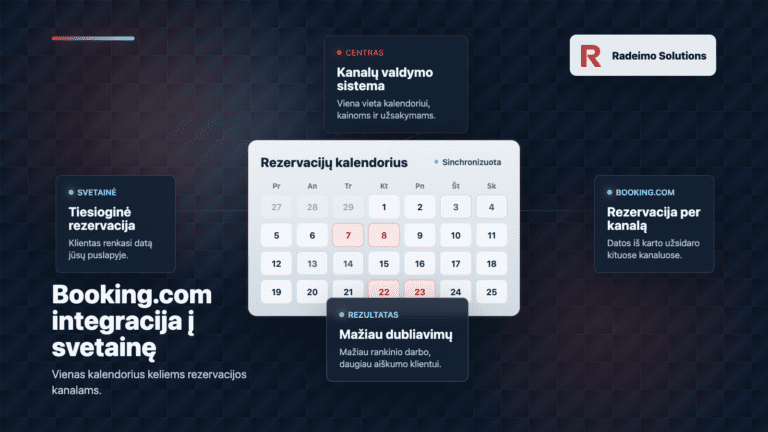
That intermediate solution is a third-party reservation system or channel management system. It connects to Booking.com, to the website, and sometimes to other channels like Airbnb, Vrbo or Expedia. Then everything is managed from one place.
How such a booking system works for a website
A booking widget is usually placed on the website. This can be a form, a calendar or the entire booking module. The visitor chooses a date, service, room or time and the request goes to the central reservation system instead of a separate WordPress form.
The same central system is also connected to Booking.com. If a booking comes through the website, it closes that time on Booking.com. If the booking comes through Booking.com, it closes that time on the website. This is where Booking.com's synchronisation of bookings comes in, so that you don't have to check two or three calendars every evening.
Technologically, things can be quite simple. The complexity lies not in the button or the website itself, but in the fact that data needs to move reliably, quickly and in both directions. This is where the difference between a simple booking form and a real booking system for a website becomes apparent.
What problem does it solve
The main problem is double bookings. But in reality, there's more to it than that. When calendars don't connect, someone needs to manually transfer information. You have to check dates, change availability, reply to customers and hope that nothing is missed.
As long as there are few bookings, it's still possible to stretch. But all it takes is a busy weekend, a festive period or several channels at once and manual work becomes a weak point. One unbooked evening can cost more than several months of integration fees.
A smooth integration of channel managers helps to avoid such situations. It saves time, reduces the likelihood of mistakes and gives the customer a clearer process. And a customer who receives a confirmation, arrives without any misunderstandings and leaves a good review afterwards is more valuable to the business than it seems. Good feedback works quietly afterwards, but for a very long time.
The question of the purpose of the website is very relevant to this topic. If your website is not just about looking good, but also about getting orders, it is worth looking at, how to assess whether a website is actually working.
How much third-party solutions cost
Prices checked on 24 May 2026. It's always worth checking them on the suppliers' official websites as plans, currencies, taxes and discounts change. However, the general direction is clear. Such systems usually cost a few tens of euros a month rather than hundreds of euros, or even less.
Starting at around €16 per month in the annual plan. The final price depends on the plan, number of properties, currency and taxes.
The first recommendation when you need a clear solution with a booking widget for your website, Booking.com connection and easy management in one place.
Professional Flex from €29 per month plus 0.9% booking fee. Professional Prepaid is shown from €31.50 per month with an annual discount.
A good option when you want clear pricing, without a complicated launch and with synchronisation between Booking.com, Airbnb, Expedia and other channels.
From €15.90 per month, additional channel management connections from €0.55 per month.
A flexible and technologically strong choice, especially when it is important to pay only for the connectors you use, but may require more patience in configuration.
On balance, Lodgify is worth keeping in first place. Not because it is necessarily the cheapest. The cheapest choice is not always the best, especially when it comes to reservations and customer experience. Lodgify is strong because it combines a booking engine for the website, channel management and a user-friendly calendar in one system. For a small or medium-sized business, this is often more important than the difference of a few euros.
Smoobu looks attractive for those who want simplicity and a clear start. Beds24 can be very good when more flexibility and more precise price control based on the connectors used is needed. But if we are talking about a business that wants to neatly connect a website, Booking.com and direct bookings without a lot of technical hassle, Lodgify seems like the safest place to start here.
Why that tax often pays for itself
When a business sees another monthly subscription, it is natural to question it. Especially if it seems like „it's just a calendar“. But it's not just a calendar. It's about preventing mistakes, saving time and improving customer experience.
One duplication can lead to a very unpleasant situation. Having to explain to one customer that there is no more space. Maybe another date needs to be offered, a refund needs to be given, a compensation needs to be negotiated. A customer may leave a bad review, which is then seen by others. And then not only one booking is lost, but also part of the trust.
On the other side is an orderly process. The client sees the available dates, receives confirmation, arrives stress-free and has less reason to be angry afterwards. If the experience is good, they can come back. They can recommend. Can leave a testimonial that helps a future client make a faster decision.
This is where the reservation system becomes part of the business process, not an expense. Just like clear pricing on the website, It reduces uncertainty and makes it easier for people to make decisions.
Who's interested in such integration
Although the most common types of accommodation are apartments, hotels, farmhouses or short-term rentals, the principle applies more widely. If a business accepts online bookings and displays the same places, times or services across multiple channels, it needs one reliable calendar.
for accommodation services that work with Booking.com and their website
for farmhouses, holiday homes and apartments
for service businesses wishing to accept direct bookings
for businesses that no longer want to check everything manually
If a website is already up and running, there is often no need to rebuild it. It can be enough to put the booking widget in place, match the style, check the user's path and make sure that the person gets from information to booking without unnecessary obstacles. This logic is described in more detail in the article on this, how to plan your website structure.
Things to think about before installation
Before choosing a system, it's a good idea to start with the logic of operation rather than price. How many channels will be used. Is it just Booking.com, or also Airbnb, Vrbo, Expedia. Does the website need to have a simple calendar or a full payment process. Will there be different prices per season, minimum number of nights, additional services or deposits.
It is also important how the booking looks on the website itself. If the widget works technically but looks foreign, unclear or awkward on the phone, some people may still stop. The booking should be a natural part of the website, not a randomly pasted block.
The best solution is the one that goes almost unnoticed by the customer. They simply see the available date, understand the price and can book. And on the business side, the reservation appears where it is supposed to appear.
Booking.com integration is not the hardest part
The connection itself is often not very complicated if the right third party solution is chosen. The hardest part is not the code itself, but the right choice of solution and clear logic. Where the booking will take place. Where the price will be managed. What will happen when the date is taken. How the customer will get confirmation. What the website visitor will see on their phone.
Booking.com's integration into the website should not be seen as a one-off button, but as part of the entire customer journey. When this path is clear, the website not only informs, but actually helps to get bookings. Without constant manual editing, without duplication and without unnecessary misunderstandings.
If you would like to set up such a reservation system, please contact us. The first step is to assess which solution is right for your business, how to connect it to your website and how to make the bookings clear to both the customer and your business.
Views: 3
Most read
Why did the less popular LRT petition come up in a Google search?
Sometimes situations occur on the internet that at first seem completely illogical. This is just such a story. One petition raised more...
What happened during the global Cloudflare outage and why were thousands of websites down?
The minutes of dropped connections, pages that won't open, and errors that greeted users in Lithuania and other countries today reminded us that even...
Imagine a person is looking for a specific service in their city. He enters the name of the service and the city in a Google search. Then he sees one...
One of the most frequently asked questions when starting the website development process is „How soon will everything be ready?“ The answer depends on many factors....
What happened during the global Cloudflare outage and why were thousands of websites down?
The minutes of dropped connections, pages that won't open, and errors that greeted users in Lithuania and other countries today reminded us that even...
Imagine a person is looking for a specific service in their city. He enters the name of the service and the city in a Google search. Then he sees one...
How do I assess whether a website is actually working?
A website's effectiveness is more than just the number of visitors. It is possible to have a lot of page views and hardly any enquiries. You can have fewer visitors but very...
How do I assess whether a website is actually working?
A website's effectiveness is more than just the number of visitors. It is possible to have a lot of page views and hardly any enquiries. You can have fewer visitors but very...
We use cookies and other technologies on this website to ensure a smooth browsing experience. With your consent, we may process data such as browsing behaviour or unique IDs. If you do not consent or withdraw consent, certain features of the website may not work properly.
Strictly necessary cookies
Always active
These cookies help the website to run smoothly - they are essential for features such as menu functionality or language selection.
Saving preferences
These cookies help to store your preferences, such as your language preference, accessibility settings or other convenience settings. They are not intended for advertising or visitor tracking.
Analytical cookies
Helps us understand how visitors use the website so we can improve it. The information is collected anonymously.Technical storage or access that is used only for anonymous statistical purposes. Without a subpoena, a voluntary commitment from your Internet Service Provider or additional records from a third party, information stored or obtained for this purpose alone generally cannot be used to identify you.
Marketing cookies
Helps you show more relevant advertising and measure its effectiveness. Can be used on multiple pages or websites.