
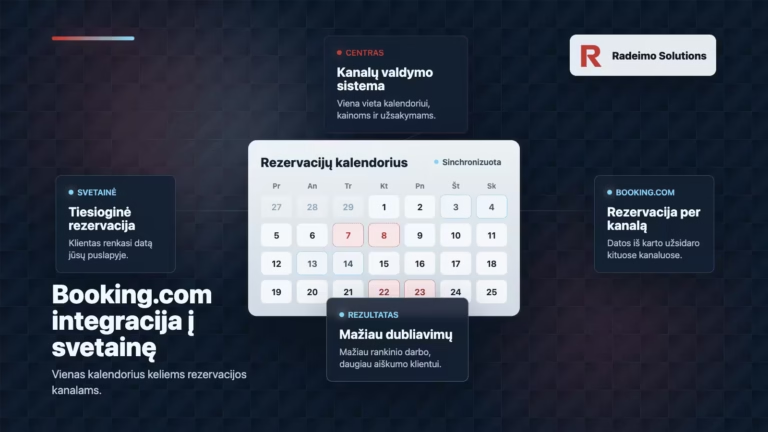
Integrating Booking.com into a website often seems like a simple technical job. There is a Booking.com account, there is a business website, so it should be possible to connect everything directly. At least it seems so at first glance.
In practice, everything is a little different. If a business has its own Booking.com account and a separate reservation system on the website, they do not automatically communicate with each other. A reservation in one place does not necessarily close immediately on the same date in another place. Then the unpleasant part begins.
A customer makes a reservation on the website, and almost at the same time, another person books the same date through Booking.com. Technically, this is called reservation duplication. It's just a bad experience from the customer side. And this is not a technical detail, this is a very practical problem.
Why Booking.com cannot simply be connected directly to a website
It is important to distinguish between two things. Booking.com has technical interfaces, but they are not designed so that each individual accommodation, service or rental business can simply add a few lines of code to their website and make it work. Booking.com dedicates its Connectivity environment to approved partners who can manage availability, prices, reservations and other data via API.
Booking.com itself states that individual properties cannot currently use direct Connectivity API connections, and connections are required through the channel management system (channel manager). In other words, what businesses need is not a random plugin, but a proven middleware solution.
That intermediate solution is a third-party reservation system or channel management system. It connects to Booking.com, to the website, and sometimes to other channels, such as Airbnb, Vrbo or Expedia. Then everything is managed from one place.
How this type of reservation system works on a website
A booking widget is usually placed on the website. It can be a form, a calendar or the entire booking module. The visitor selects a date, service, room or time, and the request does not go to a separate WordPress form, but to the central reservation system.
The same central system is also connected to Booking.com. If the reservation comes through the website, it closes that time on Booking.com. If the reservation comes through Booking.com, it closes that time on the site. This is where Booking.com's reservation synchronization comes in, which eliminates the need to check two or three calendars every night.
Technologically, everything can be quite simple. The complexity is not in the button or the website itself, but in the fact that the data must move reliably, quickly, and in both directions. This is where the difference between a simple reservation form and a real reservation system for a website can be seen.
What problem does it solve?
The main problem is double bookings. But there are actually more things behind it. When the calendars don't connect, someone needs to manually transfer the information. You have to check dates, change availability, respond to clients and hope that nothing has been overlooked.
As long as there are few reservations, it can still be delayed. But it is enough to have a busy weekend, a holiday period or several channels at the same time, and manual work becomes a weak point. One unmarked evening can cost more than several months of integration fees.
Neat channel manager integration helps to avoid such situations. It saves time, reduces the chance of errors and gives the customer a clearer process. And a customer who receives confirmation, arrives without misunderstandings and leaves a good review after everything is more valuable to the business than it seems. Good feedback later works quietly but for a very long time.
The question of the website's purpose is also very relevant to this topic. If your website needs to not only look good, but also help you get orders, it's worth a look. how to check whether a website is actually working.
How much do third-party solutions cost?
Prices checked in 2026. May 24 It is always worth checking the official pages of the providers, as plans, currencies, fees and discounts change. However, the general direction is clear. Such systems usually cost not hundreds of euros per month, but several tens of euros or start with an even lower amount.
| The solution | Price as of 05/24/2026 | When is it worth choosing? |
|---|---|---|
| Lodgify | From around 16 EUR per month on an annual plan. The final price depends on the plan, number of objects, currency and taxes. | A strong first option when you need a clear solution with a website booking widget, Booking.com connection and convenient management in one place. |
| Smoobu | Professional Flex from 29 EUR per month and 0.9 percent. reservation fee. Professional Prepaid is displayed from 31.50 EUR per month with an annual discount. | A good option when you want clear pricing, without a complicated start and synchronization with Booking.com, Airbnb, Expedia and other channels. |
| Beds24 | From EUR 15.90 per month, additional channel management connections are calculated from EUR 0.55 per month. | A flexible and technologically strong option, especially when it is important to pay only for the connections you use, but may require more patience during configuration. |
Overall, Lodgify should be ranked first. Not because it's necessarily the cheapest. The cheapest option is not always the best, especially when it comes to reservations and customer experience. Lodgify's strength is that it combines a website booking controller, channel management and a convenient calendar in one system. For a small or medium-sized business, this is often more important than a difference of a few euros.
Smoobu looks appealing to those who want simplicity and a clear start. Beds24 can be very good when you need more flexibility and more precise price control based on the connectors used. But if we're talking about a business that wants to seamlessly connect a website, Booking.com, and direct bookings without a lot of technical hassle, Lodgify seems like the safest place to start.
Why that fee often pays off
When a business sees yet another monthly subscription, it's natural to be skeptical. Especially if it seems like "it's just a calendar". But it's not just a calendar. It's here to prevent errors, save time and improve the customer experience.
One duplication can lead to a very unpleasant situation. It is necessary to explain to one customer that there is no more room. Maybe you need to offer another date, return the money, arrange compensation. A customer can leave a bad review, and that review is then visible to others. And then not only one reservation is lost, but also part of the trust.
On the other side, there is an orderly process. The customer sees available dates, gets confirmation, arrives stress-free and has less reason to be angry afterwards. If the experience is good, he can come back. Can recommend. Can leave a review that helps a future customer make a decision faster.
At this point, the reservation system becomes part of the business process rather than an expense. As it is clear presentation of prices on the website, it reduces uncertainty and helps a person make a decision more easily.
Why is such an integration relevant?
Although it is mostly about apartments, hotels, homesteads or short-term rentals, the principle applies more widely. If a business takes reservations online and shows the same locations, times or services on multiple channels, it needs one reliable calendar.
- for accommodation services that work with Booking.com and their website
- for homesteads, vacation homes and apartments
- for service businesses that want to accept direct bookings
- for businesses that no longer want to check everything manually
If the website is already working, there is often no need to create it from scratch. It may be enough to neatly place the booking widget, match the style, check the user path and make sure that the person goes from information to booking without unnecessary obstacles. Such logic is described in more detail in the article on how to plan a website structure.
Things to consider before installation
Before choosing a system, it is worth starting not with the price, but with the logic of operation. How many channels will be used. Do you need only Booking.com, or Airbnb, Vrbo, Expedia? Should the site have a simple calendar or a full checkout process. Will different prices be required depending on the season, minimum number of nights, additional services or deposits.
It is also important how the reservation will look on the website itself. If a widget technically works but looks foreign, unclear, or awkward on a phone, some people may still be put off. The reservation should be a natural part of the website, not a randomly pasted block.
The best solution is one the customer barely notices. They simply see an available date, understand the price and can make a reservation. On the business side, the booking appears exactly where it should.
Booking.com integration for a website is not the hardest part
The connection itself is often not very difficult if the right third-party solution is chosen. The most difficult part is not the code itself, but the correct choice of solution and clear logic. Where will the reservation take place? Where the price will be controlled. What happens when the date is taken. How the customer will receive confirmation. What the website visitor will see on the phone.
Booking.com's website integration should not be viewed as a one-off button placement, but as part of the entire customer journey. When this path is clear, the site not only informs, but also actually helps to get reservations. Without constant manual correction, without duplication and without unnecessary misunderstandings.
If you want to set up this kind of booking system, get in touch. The first step is to assess which solution fits your activity, how to connect it to the website and how to make reservations clear for both the client and the business.